A-share short-term review · MCP● Releasedv2.1.0 · 2026-10-11 · ★ 678

Vibe AStock

A short-term review and tracking workbench for China A-shares. Watch moves in your holdings, watchlist and yesterday's limit-up ladder during the session. After the close, read the sentiment figures and have AI write a five-part review; conditions you set are checked automatically after the next close. Log your own trades in a journal to look back on. Code computes quotes and statistics, and AI only interprets them. Through MCP, Claude Code, Codex or Cursor can fetch data, start research and read reports and evidence directly.

For Independent investors who trade A-shares short term, want a daily review on the same consistent measures, and want their own agent to fetch short-term data directly.

Runs on Windows 11, macOS and Linux with Node.js 22.18+ (24 LTS recommended), Python 3.11+ (3.12 recommended) and Git. The web page uses port 5940 by default, so it can run alongside Vibe Research. Portable zips for Windows x64, Apple silicon and Intel Macs are also available; they are unsigned and have not been validated on physical machines. Watch, the closing data capture and scheduled snapshots run only while the app is open. Upgrading from v1.x means a fresh install, with data imported under Connect AI. Setup and verification scope in the README ↗
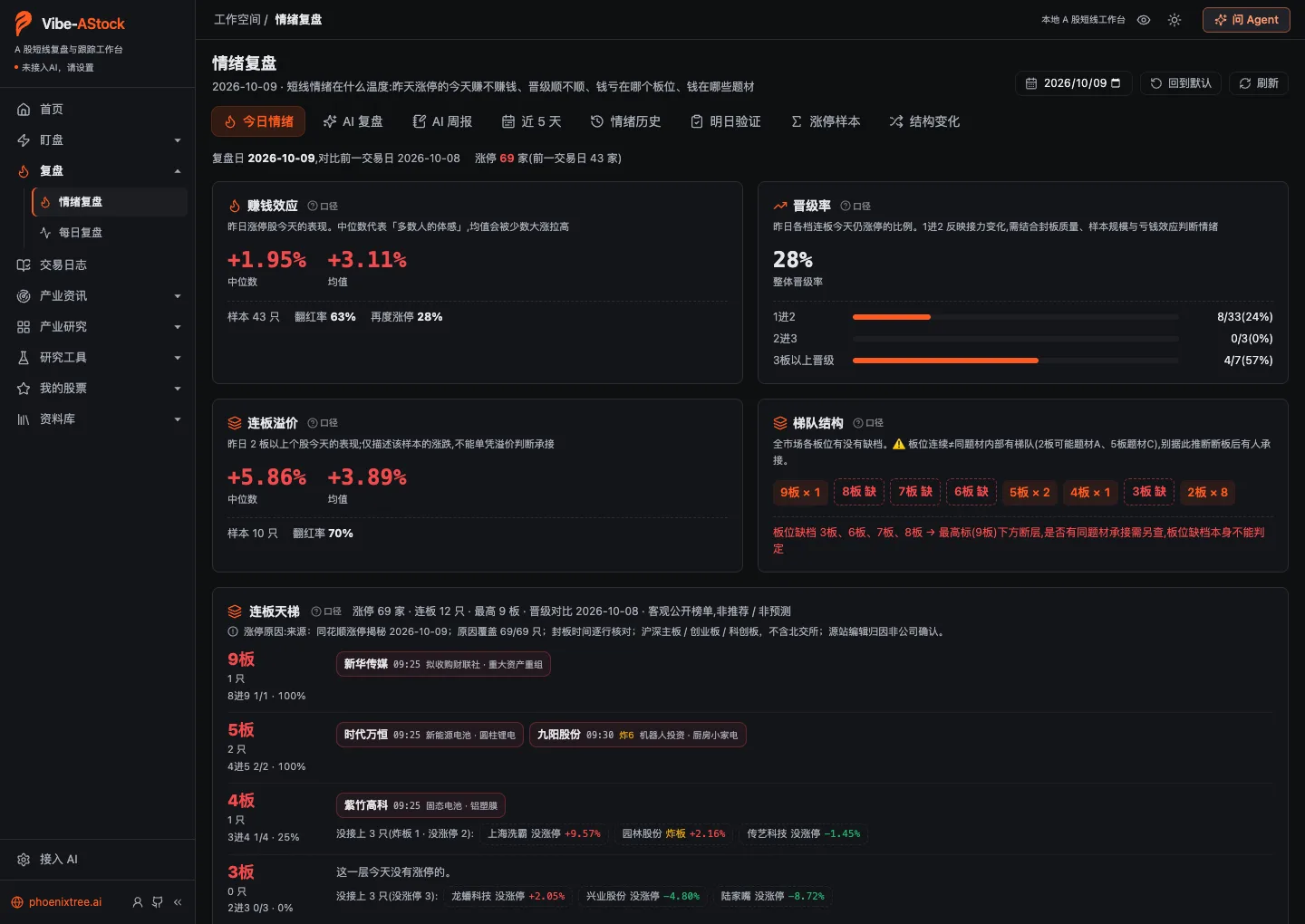
Vibe AStock sentiment review: money-making effect, promotion rate, streak premium, ladder structure and the board ladder
From the v2.1.0 repository · public market data for 9 October 2026 · shows the interface only; not investment advice
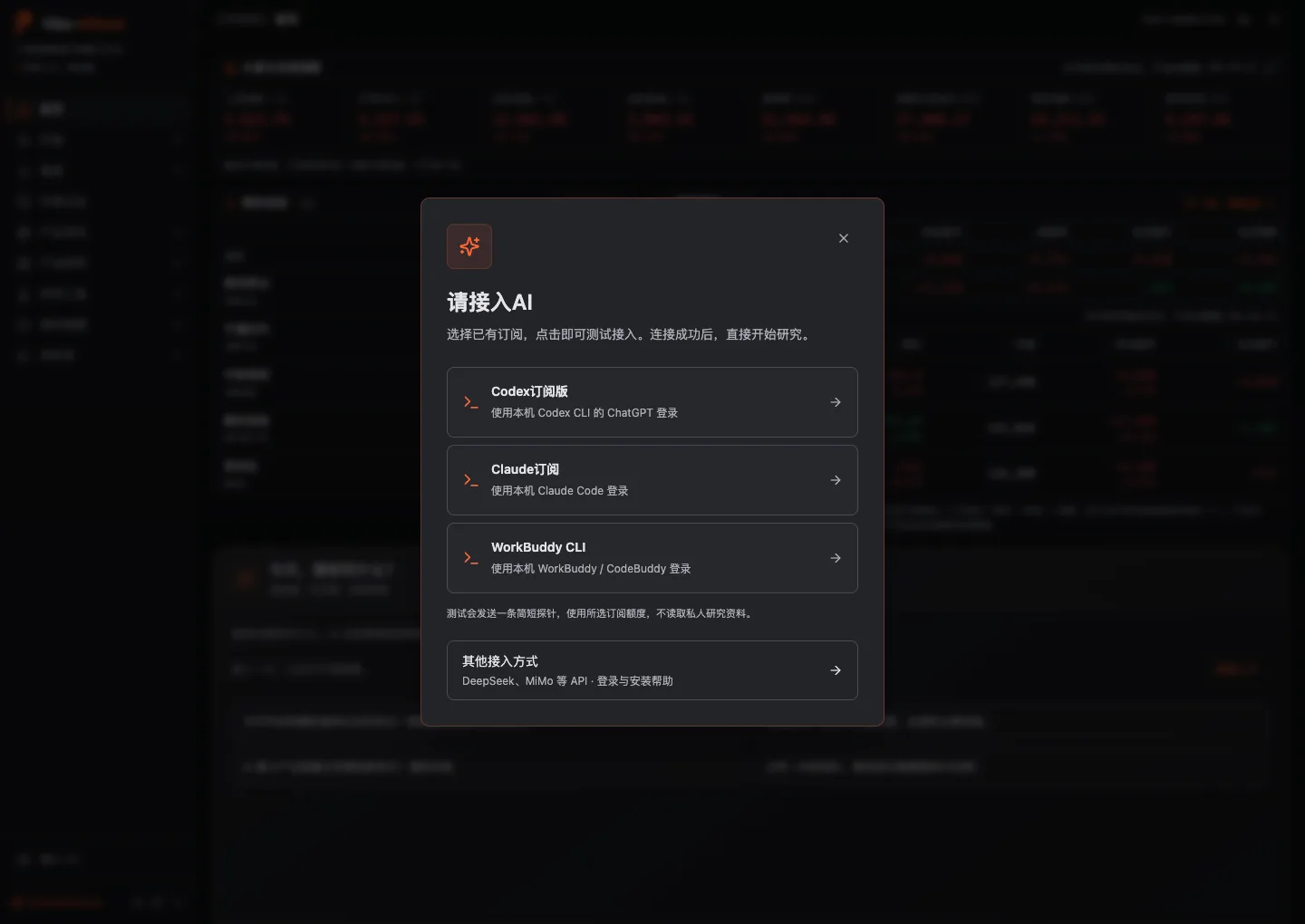
Vibe AStock first-run Connect AI dialog: Codex, Claude, WorkBuddy CLI and other API options
From the v2.1.0 repository · the dialog shows options only and is not evidence that any account passed a connection test
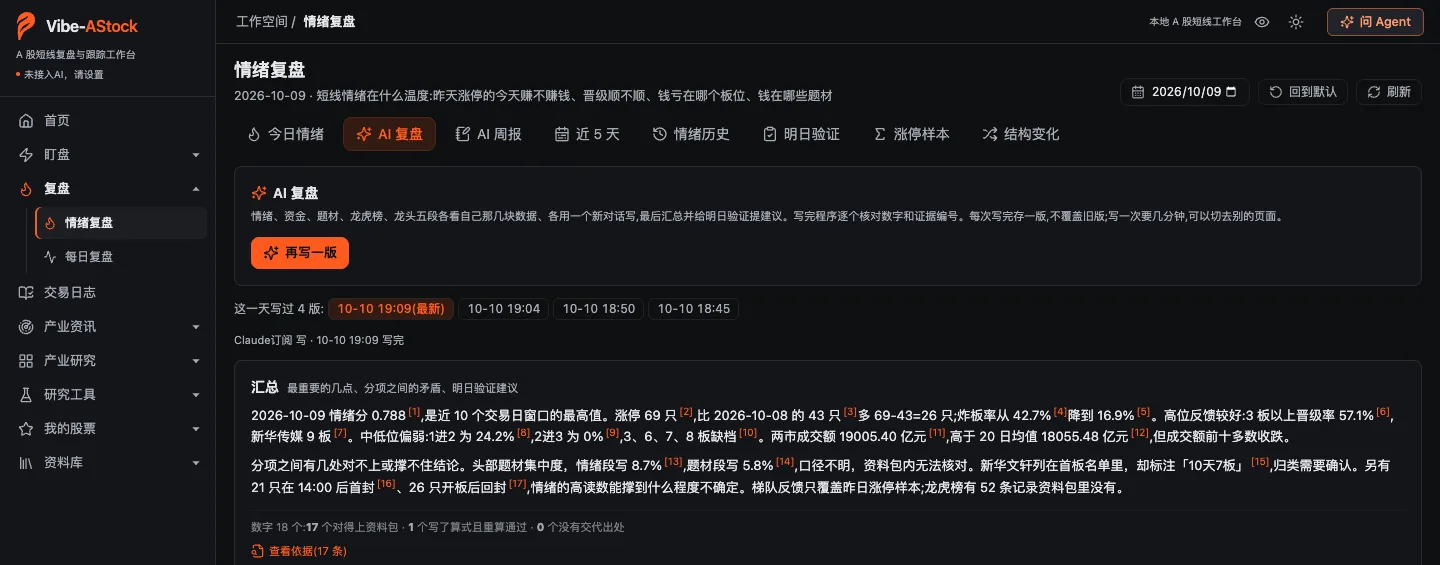
Vibe AStock AI review summary: numbers carry reference marks, with the check result and a link to view each basis
From the v2.1.0 repository, summary section only · a review written on 10 October 2026 for 9 October with a Claude Code subscription, shown unchanged to illustrate the checks; not investment advice

The work

What it keeps together

  • Watch holdings, the watchlist and yesterday's ladder during the session; sharp moves and limit-up seals or breaks are logged by fixed rules
  • After the close, AI writes a five-part review covering sentiment, fund flows, themes, the trading-desk list and leading stocks, with every number checked by code; the conditions you set are checked automatically after the next close
  • A trade journal groups your own trades by the sentiment and board position on the entry day; it stays on your computer and is never sent to the AI

One task through the system

  1. 01

    Watch

    During trading hours the page refreshes while open: a move of more than 1.5% within three minutes is logged as a sharp rise or fall, and touching or leaving the limit-up price is logged as a seal or a break. These are market events that already happened, not recommendations.

  2. 02

    Review

    The review date defaults to the latest closed trading day. Code computes the money-making effect, promotion rates, the board ladder and other figures; AI interprets them in five parts, and every run is kept as a new version.

  3. 03

    Check

    Numbers in the text are checked in three grades: matched to the data pack, formula recomputed and passed, or no source given. Every evidence ID is checked. Conditions are checked automatically after the next close.

  4. 04

    Look back

    The trade journal groups your win rate by sentiment, board position, setup and whether you followed your plan. It is a record of your past behaviour, not advice on the next trade.

The workspace

Ten sections, with short-term tools first.

01

Home

Market and global indices, watchlist and holdings P&L first, then a conversation with AI.

02

Watch

Live: current readings and intraday moves for holdings, the watchlist, yesterday's ladder, large caps and the top ten by turnover. Auction and session: the opening auction for yesterday's limit-up stocks and the sentiment path at six set times.

03

Review

Sentiment review: money-making effect, promotion rates, the board ladder, the theme tree, first-board names, AI daily and weekly reviews, next-day checks and limit-up sample statistics. Daily review: breadth, volume, margin balances and fund flows.

04

Trade journal

Each trade is matched to the sentiment and board position on its entry day, with risk and discipline, reviews and setup cards. It stays on your computer and is never sent to the AI.

05

Industry news

News radar and industry signals: news, filings and event leads, plus supply-chain data.

06

Industry research

Twenty sectors, each with step-by-step research prompts. Your AI researches the content; the product does not prefill it.

07

Research tools

Company deep dive (six-stage research for A-shares, Hong Kong and US stocks), bull/bear debate (A-shares only for now), backtesting and a candidate screen.

08

My stocks

Watchlist and holdings, an event calendar, and pre-market and after-close reminders. Holdings come from a trade ledger; there is no order placement.

09

Library

Import your own research documents and ask questions with citations back to the source; research, backtest and debate reports are kept by date.

10

Connect AI

Choose a subscription or model API. Once the test passes, the whole workbench uses it. Data from the old v1.x is imported here too.

MCP

Connect it to your agent.

Run this in the repository folder after setup. For Codex use codex mcp add with the same arguments; Cursor setup is in the README.

claude mcp add vibe-astock -- node "$(pwd)/orchestrator/src/mcp.ts"
  • Eight tools: seven read-only (endpoint list, data fetch, research status, report, evidence, research list and knowledge files) and one that starts research, currently A-shares only. Data fetches include the short-term endpoints.
  • Fetching data and reading reports or evidence needs no AI. Starting research uses this computer's default background AI source and consumes that provider's quota.
  • The MCP server runs on your computer after Vibe AStock is installed. It is not a cloud API, and it does not read the trade journal or holdings.

Connect AI

Use an existing subscription or a compatible API.

Claude Code subscription
Install Claude Code locally and sign in with a claude.ai subscription. API key, Bedrock and Vertex sign-ins do not count as a subscription.
Codex subscription
Install the official Codex CLI (0.160.0 or later) and sign in with a ChatGPT account. Codex signed in with an API key is not accepted.
WorkBuddy / CodeBuddy
Use an installed, signed-in WorkBuddy desktop app or Tencent's official CodeBuddy CLI.
Model API
Any service compatible with Chat Completions and tool calling, such as DeepSeek, Qwen, Zhipu GLM, Kimi, MiMo or OpenAI. Built-in templates have not been tested with real keys; your own connection test decides.

Current product

What exists today

  1. 01v2.1.0 was released on 11 October 2026 with source code and Windows / macOS portable builds; since v2.0.0 it shares the Vibe Research base
  2. 02A local MCP server for Claude Code, Codex and Cursor: eight tools, seven read-only and one that starts research (A-shares for now)
  3. 03A data registry of 182 endpoints in 35 layers, 14 of them short-term: sentiment figures, the board ladder, the theme tree, first-board names, yesterday's ladder and more
  4. 04Numbers in AI reviews are checked by code in three grades and every evidence ID is checked; data after the review date never enters the data pack
  5. 05Before v2.0.0, the old and new code were run on real trading days such as 9 October 2026 and compared item by item: sentiment figures, fact tables, the theme tree, first boards and yesterday's ladder match, apart from deliberately corrected measures

Not done yet

Still open in this version

  • Live refresh, intraday moves and scheduled snapshots in Watch have not yet been tested during trading hours
  • AI daily and weekly reviews have been tested only with a Claude Code subscription; Codex, WorkBuddy and model APIs have not yet run these two features
  • Starting research through MCP and bull/bear debate support A-shares only for now
  • Windows has not been validated on a physical machine and Windows 10 is unverified; portable builds are unsigned; built-in model API templates have not been tested with real keys

Boundary

What it will not do

  • No stock picks, no price predictions and no trade timing; intraday moves are market events that already happened, not recommendations
  • Sentiment grades and cycles are an analytical framework, not objective fact; limit-up samples are market statistics, not a strategy backtest
  • Public data, calculations and AI interpretation can all be wrong; a citation does not make an inference correct, and past results do not predict the future
Back to products